Best CPU Cooler for i9 14900k to Maximize Performance
The i9 14900k runs hot, so picking the right cpu cooler for i9 14900k is essential. A strong cooler keeps temperatures low, boosts overclocking headroom, and extends your processor lifespan. Whether you choose an AIO liquid cooler or a high-end air cooler, this guide covers the top options, key specs, and practical tips to help you make the best choice for your build.
The Intel Core i9 14900k is a beast of a processor. It delivers incredible speed, but it also generates a lot of heat. If you want to get the most out of this chip, you need a solid cpu cooler for i9 14900k. Without the right cooling solution, your processor can thermal throttle, which means it slows down to protect itself. Nobody wants that.
In this guide, we break down the best coolers on the market right now. We look at air coolers, AIO liquid coolers, and everything in between. We also share practical tips to help you install your cooler properly and keep your system running cool for years.
Key Takeaways
- The i9 14900k runs very hot: It needs a powerful cooler to stay within safe temperature limits.
- Air coolers and AIO liquid coolers are the two main options, each with clear pros and cons.
- Top picks include the Noctua NH-D15, Arctic Liquid Freezer II, and Corsair iCUE H150i.
- Thermal paste quality and fan placement matter just as much as the cooler itself.
- Noise level and build quality should influence your final decision.
- Budget and case compatibility are key factors before you buy.
- Proper installation ensures maximum cooling performance and longevity.
📑 Table of Contents
Why the i9 14900k Needs a Strong Cooler
The i9 14900k has a high TDP (thermal design power) of up to 253 watts when overclocked. That is a lot of heat for a single chip. When your processor gets too hot, it drops its clock speeds to avoid damage. This is called thermal throttling, and it kills performance.
A good cpu cooler for i9 14900k does more than just lower temperatures. It also reduces fan noise, improves system stability, and helps your processor last longer. If you plan to overclock your chip, a strong cooler is not optional. It is a must-have.
Understanding TDP and Heat Output
TDP stands for thermal design power. It tells you how much heat your processor produces under load. The i9 14900k can push over 250 watts. Your cooler needs to handle that heat efficiently. Look for coolers rated for high-wattage processors to be safe.
Air Coolers vs. AIO Liquid Coolers
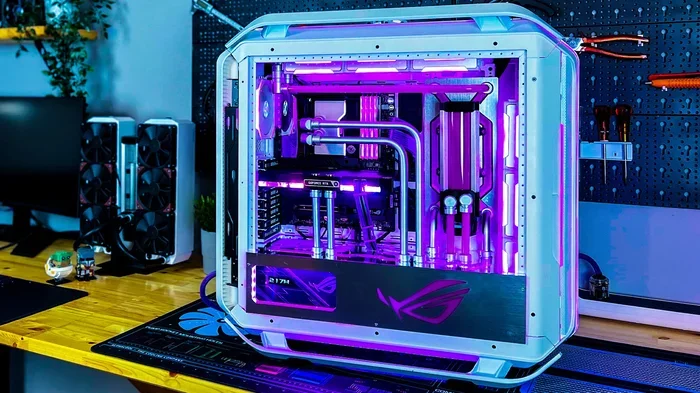
When shopping for a cpu cooler for i9 14900k, you will face two main choices. Air coolers use fans and a heatsink. AIO (all-in-one) liquid coolers use a radiator, pump, and fans. Both have strengths.
Air coolers are simpler, more reliable, and often cheaper. They do not have pumps that can fail. AIO liquid coolers offer better cooling in tight spaces and look great in themed builds. They also tend to run quieter under heavy loads.
Air Cooler Pros and Cons
- No risk of leaks
- Lower price point
- Easy to install and maintain
- Can be very bulky and may not fit in smaller cases
- Less effective for extreme overclocking
AIO Liquid Cooler Pros and Cons
- Excellent cooling performance
- Fits in most PC cases easily
- Quieter operation under load
- Higher cost than air coolers
- Pump failure risk over time
- More complex to install
Top CPU Coolers for the i9 14900k
Here are our top picks for the best cpu cooler for i9 14900k. We chose these based on cooling power, noise levels, build quality, and value.
Noctua NH-D15
The Noctua NH-D15 is a legendary air cooler. It features a dual-tower design with two fans. It handles the i9 14900k with ease and keeps noise levels low. Build quality is outstanding, and it comes with excellent thermal paste included.
Arctic Liquid Freezer II 360
This AIO liquid cooler offers fantastic cooling at a fair price. The 360mm radiator dissipates heat very effectively. It is easy to install and works beautifully with the i9 14900k. Many users praise its cooling performance and quiet fans.
Corsair iCUE H150i Elite Capellix
If you want a premium liquid cooler with RGB lighting, this is a great pick. The 360mm radiator delivers top-tier cooling. The software lets you customize fan curves and lighting. It is a strong choice for gamers and creators alike.
What to Look for When Buying
Not all coolers are the same. Before you buy a cpu cooler for i9 14900k, consider these factors:
- Compatibility: Check that the cooler fits your motherboard and case.
- Cooling power: Look for coolers that handle 250+ watts of heat.
- Noise level: Check fan speed and decibel ratings.
- Build quality: Metal construction lasts longer than plastic.
- Ease of installation: Some coolers need more effort than others.
- Budget: Set a price range before you start shopping.
Quick Tips for Best Cooling Performance
Even the best cpu cooler for i9 14900k will not work well if you skip a few steps. Follow these tips for the best results:
- Always clean old thermal paste before applying new paste.
- Apply a pea-sized dot of paste in the center of the processor.
- Make sure your cooler is mounted evenly and tight.
- Set your fans to a curve that balances cooling and noise.
- Keep your case airflow clean with dust filters.
- Check temperatures regularly using software like HWMonitor.
Common Mistakes to Avoid
Many users make simple mistakes that hurt their cooling. Here are a few to watch out for:
- Skipping thermal paste: This is the most common error. Never reuse old paste.
- Tightening screws unevenly: This causes uneven pressure and poor contact.
- Ignoring case airflow: A great cooler cannot help if your case has bad airflow.
- Overlooking fan placement: Front fans should pull cool air in, rear fans should push hot air out.
- Buying the cheapest option: A weak cooler will let your i9 14900k thermal throttle under load.
Final Thoughts
Choosing the right cpu cooler for i9 14900k is one of the most important decisions you will make for your build. A great cooler keeps your processor running fast, quiet, and safe. Whether you go with an air cooler like the Noctua NH-D15 or an AIO liquid cooler like the Arctic Liquid Freezer II, you cannot go wrong with any of the picks above.
Take your time, check your case compatibility, and do not skip the thermal paste. Your i9 14900k deserves the best cooling you can give it. Apply these tips, and you will enjoy a cool, stable, and powerful system for years to come.
Frequently Asked Questions
What is the best cpu cooler for i9 14900k?
The Noctua NH-D15 and Arctic Liquid Freezer II 360 are among the top choices. They offer excellent cooling, low noise, and great value for the i9 14900k. Your best pick depends on your budget and case size.
Do I need liquid cooling for the i9 14900k?
Not always. A high-end air cooler like the Noctua NH-D15 can handle the i9 14900k well. However, if you plan to overclock heavily or have a compact case, an AIO liquid cooler is a better choice.
How important is thermal paste for the i9 14900k?
Thermal paste is extremely important. It fills tiny gaps between the processor and cooler, helping heat transfer. Always use fresh, high-quality thermal paste for the best results.
Can a bad cooler damage the i9 14900k?
A poor cooler will not directly damage your processor, but it can cause thermal throttling. This means your chip slows down to avoid overheating, which hurts performance significantly.
How do I know if my cpu cooler fits my case?
Check your case specifications for maximum cooler height and radiator support. Most manufacturers list these dimensions clearly. Always double-check before buying a cpu cooler for i9 14900k.
What temperature should the i9 14900k run at?
Under load, the i9 14900k should stay below 95 degrees Celsius. With a good cooler, you can expect temperatures in the 70s to low 80s. Keep an eye on your temps using monitoring software.
=== CONCLUSION ===
Finding the best cpu cooler for i9 14900k does not have to be complicated. You now know the top options, what to look for, and common mistakes to avoid. Whether you choose a powerful air cooler or a sleek AIO liquid cooler, the right cooling solution will keep your i9 14900k running at its best. Invest in good cooling, follow our tips, and enjoy a fast, stable, and quiet PC every day.