Best AMD Motherboards for Gaming to Power Your Rig
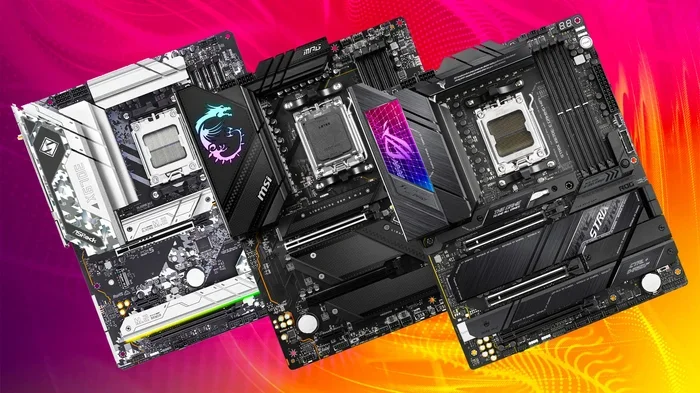
Building a gaming PC? Your motherboard choice makes or breaks the experience. The best AMD motherboards for gaming deliver fast speeds, solid VRM cooling, and future-proof features like PCIe 5.0 and DDR5 support. This guide walks you through the top picks, key features, and budget-friendly options so you can choose with confidence.
Picking the right motherboard can feel overwhelming. There are so many brands, chipsets, and features to consider. But here is the truth. Your motherboard shapes everything in a gaming PC. It connects your CPU, RAM, GPU, and storage. It determines what upgrades you can make later. When you search for the best AMD motherboards for gaming, you want a board that balances performance, features, and value.
This guide covers everything you need. From flagship boards to budget-friendly picks, we break it all down. You will learn which features actually matter for gaming. You will also discover common mistakes to avoid. Let us dive in.
Key Takeaways
- AM5 Platform is the Standard: The best AMD motherboards for gaming use the AM5 socket, supporting Ryzen 7000 and 9000 series CPUs with long-term upgrade paths.
- Chipset Choice Matters: B650 offers great value, while X670E delivers top-tier overclocking and connectivity for hardcore gamers.
- DDR5 and PCIe 5.0 are Game-Changers: These features future-proof your build and boost data transfer speeds dramatically.
- VRM Quality Affects Performance: Strong VRM designs keep your CPU cool and stable during intense gaming sessions.
- Budget Options Exist: You do not need to spend a fortune. Several affordable boards still pack impressive gaming features.
- Form Factor Impacts Build: ATX, micro-ATX, and mini-ITX boards each suit different case sizes and feature needs.
- Check Compatibility First: Always verify CPU, RAM, and GPU compatibility before purchasing any motherboard.
📑 Table of Contents
Why Your Motherboard Matters for Gaming
Some gamers overlook the motherboard. They focus on the GPU and CPU instead. But the motherboard is the backbone of your entire system. It determines how fast your components communicate. It controls how many PCIe lanes you get. It also affects your ability to overclock.
When you choose the best AMD motherboards for gaming, you are investing in stability and future-proofing. A solid board ensures your Ryzen CPU runs at its best. It also gives you room to upgrade without replacing everything.
Chipset Differences Explained
AMD uses different chipsets for its AM5 platform. The B650 chipset is the sweet spot for most gamers. It offers great features without breaking the bank. The X670E chipset is for enthusiasts. It provides more PCIe 5.0 lanes and better overclocking support.
Here is a quick look at what each chipset offers:
- B650: Solid gaming performance, DDR5 support, and PCIe 5.0 on select models. Great value for most builds.
- X670E: Top-tier connectivity, more USB ports, better VRM designs, and full overclocking capabilities.
- B650E: A middle ground with PCIe 5.0 support for both GPU and NVMe drives.
Top Picks for the Best AMD Motherboards for Gaming
Not all motherboards are created equal. Some shine in gaming performance. Others excel in connectivity and extras. Here are the standout choices across different budgets.
ASUS ROG Strix B650-E Gaming Motherboard
This board is a favorite among gamers. It offers excellent VRM cooling and strong DDR5 support. The AI-powered optimization tools make tuning easy. If you want a reliable board for a Ryzen 7 or 9, this is a top contender.
MSI MAG X670E ACE
For enthusiasts, the MAG X670E ACE delivers premium performance. It has a robust power delivery system and plenty of expansion slots. The build quality is outstanding. This board handles heavy gaming workloads with ease.
Gigabyte B650 AORUS Elite AX
Budget-conscious gamers will love this pick. It packs Wi-Fi 6E, DDR5 support, and solid VRM design at an affordable price. It is one of the best value boards in the AMD lineup.
Key Features to Look For
When shopping for the best AMD motherboards for gaming, certain features stand out. Here is what you should prioritize.
VRM Quality
The VRM (Voltage Regulator Module) delivers power to your CPU. Better VRMs mean more stable performance. They also keep temperatures lower under load. If you plan to overclock, this matters even more.
DDR5 Memory Support
DDR5 RAM is faster than DDR4. It boosts gaming performance and multitasking. Most modern AMD boards support DDR5. Make sure the board you choose does too.
PCIe 5.0 Compatibility
PCIe 5.0 offers double the bandwidth of PCIe 4.0. This means faster GPU and SSD speeds. Not every board has it yet, but many newer models do.
Connectivity Options
Look for boards with plenty of USB ports, M.2 slots, and built-in Wi-Fi. These extras make your gaming setup more convenient and versatile.
Budget vs Premium: Which Is Right for You?
Not everyone needs a $400 motherboard. In fact, many gamers get great performance from mid-range boards. The key is knowing what you actually need.
If you are building a budget gaming PC, a B650 board is the way to go. It handles Ryzen CPUs beautifully. You will not miss out on gaming performance. If you are building a high-end rig with a Ryzen 9 and an RTX 4090, consider an X670E board. It gives you the headroom and features for a premium experience.
Common Mistakes to Avoid
Even experienced builders make mistakes. Here are a few to watch out for.
- Skipping BIOS Updates: Always check if the motherboard needs a BIOS update for your CPU. An outdated BIOS can cause compatibility issues.
- Ignoring VRM Temperatures: Poor VRM cooling leads to thermal throttling. Use a board with decent heatsinks.
- Overlooking Compatibility: Make sure your CPU, RAM, and case all fit the motherboard. Check the form factor and socket type.
- Buying More Than You Need: A top-tier X670E board is overkill for a budget build. Match the board to your actual needs.
Final Thoughts
Choosing the best AMD motherboards for gaming does not have to be stressful. Start by deciding your budget and needs. Then pick a chipset that fits. Focus on VRM quality, DDR5 support, and connectivity. Whether you go with a B650 or X670E board, the right choice will power your gaming rig for years to come.
Take your time. Read reviews. Compare specs. The perfect motherboard is out there waiting for you. Happy building.
Frequently Asked Questions
What is the best AMD motherboard for gaming on a budget?
The Gigabyte B650 AORUS Elite AX is one of the best budget options. It offers DDR5 support, Wi-Fi 6E, and solid VRM design at an affordable price. You get great gaming performance without overspending.
Do I need an X670E motherboard for gaming?
Not necessarily. Most gamers do just fine with a B650 board. X670E is best for enthusiasts who want extra PCIe 5.0 lanes and overclocking features. If you are building a standard gaming rig, B650 is the smarter choice.
Can I use DDR4 RAM with AM5 motherboards?
Most AM5 boards support DDR5, but some budget models also support DDR4. Always check the specifications before buying. DDR5 offers better performance, but DDR4 boards can still deliver solid gaming results.
Is PCIe 5.0 important for gaming right now?
It is nice to have but not essential yet. PCIe 5.0 gives faster GPU and SSD speeds. However, current-gen GPUs and SSDs do not fully use PCIe 5.0 yet. You can still game great on PCIe 4.0 boards.
How important is VRM quality for gaming?
VRM quality matters most if you plan to overclock or use high-end CPUs like the Ryzen 9. For mid-range builds, a standard VRM design works fine. Good VRMs keep your system stable and cool under heavy loads.
Should I buy a motherboard with built-in Wi-Fi?
Built-in Wi-Fi is very convenient. It saves you from buying a separate Wi-Fi card or adapter. Most mid-range and premium boards now include Wi-Fi 6E. If you want a clean, cable-free setup, it is worth having.