Best Gaming Monitors Under 500 Dollars For Gamers
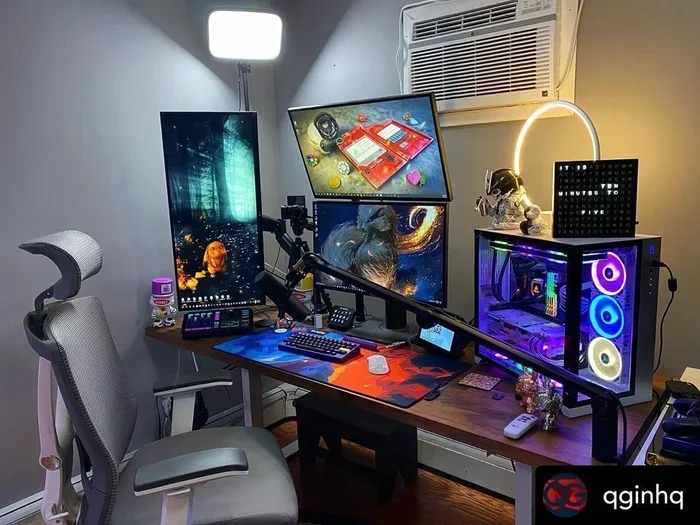
Finding the best gaming monitors under 500 dollars is easier than you think. You do not need to spend a fortune to enjoy smooth gameplay, vibrant colors, and responsive screens. In this guide, we break down the top picks, key features, and buying tips that will help you choose the perfect budget gaming monitor for your setup.
Gaming has changed a lot over the past few years. You do not need to blow your entire paycheck on a screen anymore. The best gaming monitors under 500 dollars can give you a fantastic experience without breaking the bank. Whether you play shooters, racing games, or RPGs, a solid budget monitor makes a huge difference.
But with so many options out there, how do you pick the right one? That is where this guide comes in. We have done the research for you. We looked at refresh rates, panel types, color accuracy, and overall value. By the end, you will know exactly what to buy and why.
Key Takeaways
- Affordable does not mean low quality: Many monitors under 500 dollars now offer 144Hz refresh rates and fast response times.
- Panel type matters a lot: IPS panels deliver the best colors and viewing angles for gaming on a budget.
- Adaptive sync is a game changer: Look for FreeSync or G-Sync compatible models to reduce screen tearing.
- Size and resolution go hand in hand: A 27-inch 1080p monitor is the sweet spot for budget gaming displays.
- Check connectivity options: Multiple HDMI and DisplayPort inputs give you more flexibility with your setup.
- Avoid common mistakes: Do not ignore response time, refresh rate, or panel type when shopping on a budget.
📑 Table of Contents
Why a Budget Gaming Monitor Still Delivers Great Performance
Some people think cheap means low quality. That was true ten years ago, but not today. Monitor makers have found smart ways to cut costs without hurting performance. You can get features that used to cost twice as much.
A good budget gaming monitor gives you smooth motion, sharp visuals, and comfortable viewing. Many models now support 144Hz refresh rates. That means your screen refreshes 144 times per second. The result is smoother gameplay and less motion blur. Fast pixel response times also help reduce ghosting in fast-paced games.
Another big plus is color quality. Modern budget monitors use IPS panels that produce vibrant and accurate colors. You will see rich reds, deep blues, and bright whites. This matters a lot in games where you need to spot enemies in dark areas.
What to Look For in a Gaming Monitor Under 500 Dollars
Refresh Rate and Response Time
The refresh rate is one of the most important specs. Look for at least 144Hz. Higher numbers mean smoother motion. Most budget monitors stick with 144Hz, which is plenty for casual and competitive gamers alike.
Response time measures how fast a pixel changes color. Look for 1ms or 5ms. Lower numbers are better. A fast response time cuts down on motion blur and ghosting. This is especially important in shooter games where split-second reactions matter.
Panel Type and Color Accuracy
There are three main panel types: IPS, VA, and TN. IPS panels are the best choice for most gamers. They offer great color accuracy and wide viewing angles. VA panels have deeper blacks but slower response times. TN panels are fast but have poor color reproduction.
For gaming on a budget, always go with an IPS panel. The colors pop, the angles stay consistent, and the overall image looks much better than TN or VA options at this price point.
Adaptive Sync Technology
Screen tearing happens when your monitor and graphics card are out of sync. It looks awful and hurts your gaming experience. Adaptive sync fixes this problem. Look for monitors with FreeSync or G-Sync compatible support.
FreeSync is more common at this price range. It works with AMD and many NVIDIA cards. G-Sync compatible monitors are also available under 500 dollars. Both technologies make your gameplay feel much smoother and more polished.
Top Picks for the Best Gaming Monitors Under 500 Dollars
Here are some of the best options we recommend. Each one offers great value and solid performance for budget-conscious gamers.
- Acer Nitro XV272U: A 27-inch 1080p monitor with 178Hz refresh rate and 1ms response time. The colors are vibrant and the build quality is solid.
- LG 27GP850-B: This is a versatile 27-inch monitor with 144Hz to 165Hz overclocking. It uses a fast IPS panel and supports both FreeSync and G-Sync.
- Samsung Odyssey G4: A 27-inch curved monitor with 165Hz and 1ms response time. The curved design adds immersion without costing too much.
- ASUS TUF Gaming VG27AQ1A: A reliable 1440p option at 27 inches. It offers sharp text and great color accuracy for the price.
Each of these monitors hits a different sweet spot. Some focus on high refresh rates. Others prioritize resolution or color quality. Think about what matters most to you before making a choice.
How to Get the Most Bang for Your Buck
Buying a budget gaming monitor does not mean settling for less. You just need to know what matters and what does not. Here are some quick tips to help you save money and get the best screen for your dollar.
- Prioritize refresh rate over resolution. 1080p at 144Hz feels smoother than 1440p at 60Hz for most games.
- Check your graphics card first. A powerful GPU unlocks higher resolutions. A mid-range card shines at 1080p with high refresh rates.
- Look for sales and bundles. Many retailers offer monitors as part of a PC bundle. You can save 50 to 100 dollars this way.
- Do not forget about the stand. A monitor with adjustable height and tilt saves you from buying a separate monitor arm.
- Read reviews before buying. Real user feedback tells you about color accuracy, brightness, and long-term reliability.
These small steps add up. You will end up with a monitor that fits your needs and your wallet perfectly.
Common Mistakes to Avoid When Buying a Budget Gaming Monitor
Even experienced buyers make mistakes. Here are the ones you should watch out for.
- Ignoring response time: A slow response time leads to blurry motion. Always check this spec before buying.
- Choosing TN panels for color: TN panels are fast but washed out. Avoid them if color accuracy matters to you.
- Overlooking adaptive sync: Without FreeSync or G-Sync, screen tearing can ruin your experience. Do not skip this feature.
- Buying too big: A 32-inch monitor at 1080p looks pixelated. Stick with 24 to 27 inches for the best clarity at this price point.
- Skipping the return policy: Always check the return window. You want to be able to send back a monitor that does not meet your expectations.
Avoiding these mistakes saves you time, money, and frustration. A little research goes a long way.
Final Thoughts
The best gaming monitors under 500 dollars offer incredible value today. You can enjoy high refresh rates, fast response times, and great color accuracy without spending a fortune. The key is knowing what to look for and what to prioritize.
Start with your needs. Do you want smooth competitive gameplay? Go for a high refresh rate monitor. Do you care about immersive visuals? Pick one with a curved IPS panel and solid color coverage. Whatever you choose, make sure it fits your gaming style and your budget.
Take your time, compare your options, and do not be afraid to spend a little extra if a monitor checks all your boxes. A great gaming monitor lasts for years and makes every gaming session better. Happy gaming!
Frequently Asked Questions
Can I get a 1440p gaming monitor under 500 dollars?
Yes, you can. Models like the ASUS TUF Gaming VG27AQ1A offer 1440p resolution at around 350 to 450 dollars. Keep in mind that 1080p monitors at this price point often have higher refresh rates, so choose based on your priorities.
Is 144Hz enough for competitive gaming?
Absolutely. 144Hz is the standard for competitive gaming and it delivers buttery smooth motion. Most professional gamers use 144Hz or 240Hz monitors. For casual and semi-competitive players, 144Hz is more than enough.
Do I need a curved monitor for gaming?
No, you do not need one. Curved monitors add immersion, especially on larger screens. But flat monitors work just as well for most gaming setups. It comes down to personal preference and your desk space.
What is the difference between FreeSync and G-Sync?
FreeSync is an AMD technology that reduces screen tearing. G-Sync is NVIDIA’s version. Many monitors under 500 dollars offer FreeSync and are also G-Sync compatible. Check your graphics card brand before choosing.
How important is response time for gaming?
It is very important for fast-paced games. A 1ms response time reduces ghosting and motion blur. For slower games like strategy or RPGs, a slightly higher response time is fine. But for shooters and racing games, aim for 1ms to 5ms.
Can I use a gaming monitor for work and school?
Yes, you can. Gaming monitors have great color accuracy and sharp text. They work well for productivity tasks, video editing, and studying. Many models also include built-in speakers and USB hubs for extra convenience.
=== CONCLUSION ===
The best gaming monitors under 500 dollars deliver real value for every type of gamer. You get smooth refresh rates, fast response times, and vibrant colors without overspending. Focus on the features that matter most to your gaming style and you will find the perfect screen.
Use the tips and picks in this guide to make a confident choice. A great budget monitor can transform your gaming sessions and last you for years. Start shopping today and level up your setup without breaking the bank.