Best Water Cooler for CPU to Keep Your PC Running Cool
A water cooler for CPU is one of the best upgrades you can make for a smoother, quieter PC. Whether you game, stream, or work with heavy software, liquid cooling keeps temperatures low and performance high. We break down the top options, buying tips, and installation steps so you can pick the right cooler with confidence.
When your CPU gets too hot, your whole PC feels it. Fans spin up, performance drops, and your system gets loud and annoying. A water cooler for CPU solves all of these problems at once. Instead of pushing hot air around, liquid cooling pulls heat away from the processor fast and efficiently. Whether you are a gamer, a content creator, or just someone who wants a quiet setup, the right cooler makes a big difference.
## Why Your CPU Needs a Water Cooler
### The Heat Problem Is Real
Today’s processors are powerful but run hot. Chips like the Intel Core i9 and AMD Ryzen 9 can easily push past 90 degrees under heavy workloads. That kind of heat shortens component life and causes throttling, which slows your PC down. A water cooler for CPU handles this heat far better than any stock cooler ever could.
### Key Benefits of Liquid Cooling
Liquid cooling brings several clear advantages to any PC build. First, it runs much quieter because fans can spin at lower speeds. Second, it keeps CPU temperatures stable during intense tasks like gaming or video rendering. Third, it gives your build a clean, custom look that many builders love. A water cooler for CPU is especially worth it if you plan to overclock your processor for extra performance.
## Types of Water Coolers for CPU
### AIO Coolers
All-in-one coolers are the most popular choice for most users. They come pre-filled and sealed, so you never need to worry about leaks or refilling fluid. A typical AIO setup includes a radiator, one or two fans, a small pump, and a water block that sits on top of your processor. They are easy to install and work great for the vast majority of PC builds.
### Custom Loops
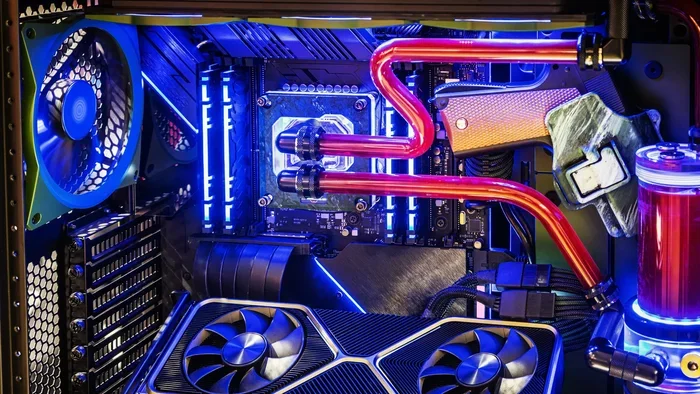
Custom loops offer the absolute best cooling performance available. You pick every part yourself, from the radiator size to the tubing and fittings. But they cost significantly more and require regular maintenance. Custom loops are best for enthusiasts who want peak performance and do not mind the extra effort.
## Top Water Coolers for CPU in 2024
### Best Overall: Arctic Liquid Freezer III 360
This cooler delivers excellent cooling at a very fair price. The 360mm radiator handles high heat loads with ease, and the fans run quietly. It also looks great with RGB lighting that adds a nice touch to any build.
### Best Budget: ID-Cooling Frostflow X 240
If you want solid cooling without spending too much, this is a great option. The 240mm radiator keeps processor temperatures low for most mid-range chips. It is simple to install and very affordable.
### Best Premium: Corsair iCUE H170i Elite LCD
This top-tier cooler features a built-in LCD display on the radiator. You can show system stats or fun animations right on your build. Cooling performance is outstanding, and the pump runs nearly silently.
## How to Choose the Right Water Cooler for CPU
### Check Your CPU Socket
Not every cooler fits every motherboard. You need to know your CPU socket type first. Intel LGA 1700 and AMD AM5 are common sockets today. Most cooler brands list compatible sockets on their product pages, so always double-check before buying.
### Consider Radiator Size
Bigger radiators provide better cooling. A 240mm radiator works well for most users. A 360mm radiator is ideal for overclocking or high-end processors that run hot. Check your case for radiator support and available fan mounts before you purchase.
### Think About Noise Levels
Some coolers are louder than others, and nobody wants a noisy PC. Pump noise can be an issue with cheaper models. Look for coolers that include rubber dampeners to reduce vibration. Reading real-world reviews helps you learn about actual noise levels from real users.
## Installation Tips for Your Water Cooler for CPU
### Step-by-Step Setup
Installing a water cooler for CPU is easier than most people think. Start by removing the old cooler and cleaning the CPU surface with isopropyl alcohol. Apply a small dot of fresh thermal paste in the center of the processor. Mount the water block securely onto the CPU using the included bracket. Attach the radiator and fans to your case, usually at the front or top. Connect the pump and fan cables to the proper motherboard headers. Power on and check for any leaks or unusual sounds.
### Common Mistakes to Avoid
Do not overtighten the water block screws. Use just enough pressure to get a good seal. Skipping thermal paste leads to poor heat transfer and high temperatures. Also, make sure your case has enough clearance for the radiator and fans. Measure your case space before you buy any cooler.
## Maintaining Your Water Cooler for CPU
AIO coolers need very little maintenance since they are sealed systems. You never need to change the fluid inside. Just keep an eye on fan and pump cables for dust buildup. After a year or two, clean the radiator fins gently with compressed air. Custom loops need more attention. You should flush the system and refill coolant every one to two years to keep everything running smoothly.
## Final Thoughts
A water cooler for CPU is one of the smartest upgrades you can make for your PC. It keeps your processor cool, quiet, and running at peak performance no matter what you throw at it. Whether you pick a budget AIO or a premium custom loop, the benefits are clear and noticeable. Take your time, compare your options, and pick the cooler that fits your build and your budget. Your PC will thank you.
Key Takeaways
- Better Cooling: A water cooler for CPU handles heat far better than stock air coolers, keeping temps low under heavy loads.
- Quieter Operation: Liquid cooling fans spin slower, which means a much quieter PC experience.
- AIO vs Custom Loop: AIO coolers are easy to install and maintain, while custom loops offer top-tier performance for enthusiasts.
- Compatibility Matters: Always check your CPU socket type and case clearance before buying a cooler.
- Easy Installation: Most AIO coolers can be installed in under an hour with basic tools.
- Low Maintenance: Sealed AIO systems need very little upkeep, making them ideal for most users.
Frequently Asked Questions
Is a water cooler for CPU better than an air cooler?
Yes, in most cases. A water cooler for CPU handles heat more efficiently and runs quieter than air coolers. It is especially useful for high-end processors and overclocking setups.
How long do AIO water coolers last?
Most AIO coolers last between five and seven years. The sealed system prevents fluid leaks, and the pump is designed for long-term use. Regular dust cleaning helps extend the lifespan.
Can I install a water cooler for CPU myself?
Absolutely. Most AIO coolers come with clear instructions and all the mounting hardware you need. If you have basic PC building experience, you can install one in under an hour.
Do water coolers need maintenance?
AIO coolers need very little maintenance since they are sealed. Custom loops require more care, including flushing and refilling coolant every one to two years.
What size radiator do I need for my water cooler for CPU?
A 240mm radiator works for most standard builds. If you have a high-end processor or plan to overclock, a 360mm radiator provides better cooling performance.
Are water coolers loud?
Most modern water coolers for CPU are very quiet. The fans spin at lower speeds, and quality pumps produce minimal noise. Reading reviews helps you find the quietest options for your setup.
=== CONCLUSION ===
Choosing the right water cooler for CPU keeps your PC cool, quiet, and performing at its best. Whether you go with an affordable AIO or invest in a premium custom loop, the benefits are clear. Pick a cooler that fits your CPU socket, your case, and your budget, and follow the installation steps carefully. With the right setup, your PC will run cooler and last longer. Start your search today and give your processor the cooling it deserves.