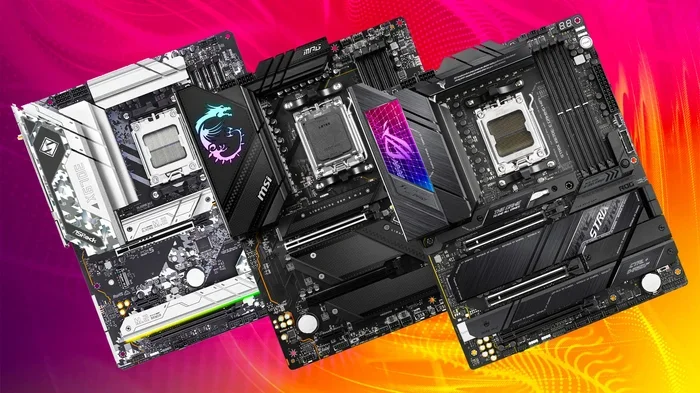
Best Motherboards for Ryzen 7 5800x Reviewed in 2024
The best motherboards for Ryzen 7 5800X depend on your budget, features, and build goals. This guide covers the top picks for 2024, from budget-friendly options to premium boards with advanced features. You will learn which motherboard delivers the best value, performance, and compatibility for your Ryzen 7 5800X build.
Choosing the right best motherboards for Ryzen 7 5800X can feel overwhelming. There are so many options, and each one promises to be the best. But not all boards are created equal. Some excel in features, while others focus on value. Your choice affects everything from performance to future upgrades.
The Ryzen 7 5800X is a powerful processor built on AMD’s Zen 3 architecture. It uses the AM4 socket and supports PCIe 4.0. To get the most out of this chip, you need a motherboard that matches its capabilities. This guide breaks down the top choices for 2024, so you can make a smart decision without the guesswork.
Key Takeaways
- B550 and X570 Chipsets Are Key: Both support PCIe 4.0 and DDR4 RAM, making them ideal for the Ryzen 7 5800X.
- VRM Quality Matters: Strong voltage regulation keeps your processor cool and stable under heavy workloads.
- Budget Options Exist: You do not need to spend a fortune to get a reliable board for the 5800X.
- Premium Boards Offer More Features: X570 boards provide extra PCIe lanes, better audio, and advanced overclocking support.
- Check BIOS Compatibility: Always verify that the motherboard supports the Ryzen 7 5800X out of the box or via BIOS update.
- Connectivity Is Important: Look for USB 3.2 ports, M.2 slots, and WiFi 6 for a well-rounded build.
📑 Table of Contents
Why the Right Motherboard Matters for Ryzen 7 5800X
Your motherboard is the foundation of your entire PC build. It connects every component and determines what features you can use. For the Ryzen 7 5800X, the right board ensures stable power delivery and fast data transfer. A poor choice can limit performance or cause compatibility issues.
The 5800X supports DDR4 RAM and PCIe 4.0 storage. You also need an AM4 socket motherboard. Not all AM4 boards are the same, though. Chipsets like B550 and X570 offer different feature sets. Some focus on overclocking support, while others prioritize connectivity and ports. Picking the right one makes a big difference.
Best Motherboards for Ryzen 7 5800X at a Glance
Best Overall: ASUS ROG Strix B550-F Gaming
The ASUS ROG Strix B550-F is a standout choice for most builders. It offers excellent VRM cooling, which keeps your processor running cool under heavy loads. The board supports PCIe 4.0 for fast NVMe SSD speeds. You also get dual M.2 slots, USB 3.2 ports, and strong audio quality. It strikes a great balance between features and price. For most users, this is the one to buy.
Best Budget Option: MSI MAG B550 Tomahawk
If you want solid performance without spending too much, the MSI MAG B550 Tomahawk is a great pick. It delivers reliable power delivery for the 5800X. The board includes WiFi 6 for wireless connectivity and plenty of USB ports. It also has good VRM thermal design. For a budget build, this board punches well above its price point. You get everything you need without overspending.
Best Premium Choice: MSI MEG X570 Unify
For enthusiasts who want every feature, the MSI MEG X570 Unify leads the pack. It uses the X570 chipset for full PCIe 4.0 support across all lanes. The VRM setup is top-notch, handling even aggressive overclocking with ease. The board also features premium audio codecs and multiple high-speed connectivity options. If budget is not a concern, this is the one to pick. It is built for those who want the absolute best.
Key Features to Look For When Buying
Not sure what to prioritize? Here are the most important features to consider when shopping for the best motherboards for Ryzen 7 5800X builds.
Chipset Compatibility – The B550 and X570 chipsets are the best choices for Zen 3 processors. Both support PCIe 4.0 and DDR4 RAM. The X570 offers more PCIe lanes, which benefits multi-GPU setups and heavy storage configurations.
VRM Quality – The voltage regulator module controls power delivery to your CPU. Better VRMs mean more stable performance, especially during overclocking. Look for boards with strong thermal pads and heatsinks on the VRM area. This is one of the most overlooked features by new builders.
Storage Connectivity – PCIe 4.0 NVMe SSDs deliver incredible speeds. Make sure your board has at least one M.2 slot that supports PCIe 4.0. Also check the number of SATA ports if you plan to use traditional hard drives alongside your SSD.
Connectivity and Ports – USB 3.2 Gen 2 ports offer fast data transfer for external drives. WiFi 6 support is a nice bonus for wireless setups. Check the rear I/O panel to make sure it has all the ports you need before you buy.
Comparison Table
Here is a quick comparison of the top picks we reviewed.
| Feature | ASUS ROG Strix B550-F | MSI MAG B550 Tomahawk | MSI MEG X570 Unify |
|---|---|---|---|
| Chipset | B550 | B550 | X570 |
| Socket | AM4 | AM4 | AM4 |
| PCIe 4.0 Support | Yes | Yes | Yes |
| WiFi | No (optional) | Yes | Yes |
| Price Range | Mid | Budget | Premium |
| Overclocking Support | Good | Good | Excellent |
This table makes it easy to compare the three top choices. Each board works well with the Ryzen 7 5800X, but they target different needs and budgets. Pick the one that fits your priorities.
Common Mistakes to Avoid
Even experienced builders sometimes make mistakes when picking a motherboard. Here are a few to watch out for.
Skipping BIOS Updates – Newer Ryzen 7 5800X chips may require a BIOS update on older B450 boards. Always check compatibility before buying. Some manufacturers offer BIOS Flashback, which makes updates easy without a CPU installed.
Ignoring VRM Cooling – The 5800X draws significant power under load. A motherboard with weak VRM cooling can throttle performance. Look for boards with robust heatsinks and thermal pads on the power delivery area.
Overlooking Future Upgrades – Even though AM4 is aging, it still has good support. Think about what you might need in the future. More M.2 slots, extra USB ports, or WiFi support can save you from buying add-in cards later.
Final Verdict: Which Board Should You Buy?
After reviewing the options, the best motherboards for Ryzen 7 5800X fall into three clear categories. For most users, the ASUS ROG Strix B550-F offers the best mix of features and value. Budget-conscious builders will love the MSI MAG B550 Tomahawk for its affordability and reliability. Enthusiasts who want top-tier performance should look at the MSI MEG X570 Unify.
No matter which board you choose, make sure it fits your needs. Consider your budget, the features you truly need, and your future upgrade plans. The right motherboard will let your Ryzen 7 5800X run at its full potential for years to come.
Frequently Asked Questions
Can I use a B450 motherboard with the Ryzen 7 5800X?
Yes, but you may need a BIOS update first. Not all B450 boards support the 5800X out of the box. Check the manufacturer’s website for a compatible BIOS version before purchasing. Some boards also offer BIOS Flashback, which makes the update process much easier.
Do I need an X570 motherboard for the Ryzen 7 5800X?
No, you do not need an X570 board. A B550 motherboard works perfectly with the 5800X. The X570 simply offers more PCIe lanes and extra features. For most users, a B550 board provides everything you need at a lower price.
Does the Ryzen 7 5800X support overclocking?
Yes, the 5800X supports overclocking on B550 and X570 motherboards. However, the gains are modest compared to higher-end Ryzen chips. A good VRM design on your motherboard is essential for stable overclocking. Make sure your board has adequate cooling around the power delivery area.
What RAM works best with the Ryzen 7 5800X?
The 5800X works best with DDR4 RAM. Look for kits rated at 3200MHz or 3600MHz for optimal performance. Ryzen processors benefit from fast memory, so choosing the right speed matters. Make sure your motherboard supports the RAM speed you plan to use.
How important is WiFi on a motherboard for the 5800X?
WiFi is convenient but not essential. Many builders use a wired Ethernet connection for the best speeds. If you prefer wireless, look for boards with WiFi 6 support. You can also add a WiFi card later if your board does not include it.
What is the best budget motherboard for the Ryzen 7 5800X?
The MSI MAG B550 Tomahawk is widely regarded as the best budget option. It offers solid power delivery, WiFi 6, and good connectivity at an affordable price. You do not have to spend a lot to get a reliable board for the 5800X.