Best Wireless Microphones for iPhone That Actually Work
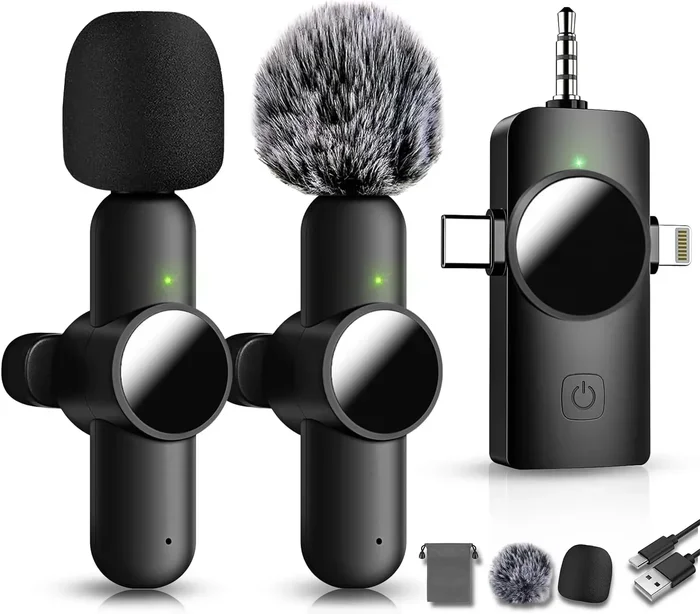
Finding the right wireless microphones for iPhone can transform your audio quality instantly. Whether you are a content creator, a podcaster, or someone who wants better call quality, the right mic makes all the difference. In this guide, we break down the top picks that actually work with your iPhone. You will learn about features, setups, and which mic fits your needs best.
You have probably experienced this before. You are recording a video or taking a call, and the audio sounds muffled, tinny, or full of echoes. It is frustrating, right? That is exactly why wireless microphones for iPhone have become so popular. They solve a very common problem with a simple, effective solution.
The good news is that you do not need to spend a fortune to get great sound. Plenty of options work seamlessly with iPhones, from budget-friendly clip-on mics to professional-grade Bluetooth systems. This guide walks you through the best choices available right now. We will cover what to look for, which mics stand out, and how to get the most out of your setup.
Key Takeaways
- Wireless microphones for iPhone give you freedom of movement while recording high-quality audio on the go.
- Lavalier mics and Bluetooth options are the most popular choices for iPhone users.
- Battery life, signal range, and compatibility matter more than you might think.
- Setting up your mic correctly eliminates background noise and improves clarity significantly.
- Affordable options work just as well as premium brands for most everyday needs.
- Always check iPhone compatibility before buying, especially with newer models.
📑 Table of Contents
Why You Need a Wireless Mic for Your iPhone
Your iPhone has a built-in microphone, and it works fine for casual use. But the moment you move away from the phone or record in a noisy space, the quality drops fast. A wireless microphone solves this problem completely.
Here is what a good mic actually gives you:
- Better audio clarity for videos and voice notes
- Hands-free recording during interviews or live streams
- Noise reduction that filters out background sounds
- Greater mobility so you can move around freely
- Professional sound quality that makes your content stand out
If you create content regularly or even just want your voice memos to sound crisp, a wireless mic is a game-changer. It takes your iPhone recordings from amateur to polished with very little effort.
Types of Wireless Microphones for iPhone
Lavalier Microphones
Lavalier mics clip onto your shirt or collar. They are small, lightweight, and perfect for vloggers and presenters. These mics pick up your voice clearly even in busy environments. Most lavalier options connect through a small adapter or directly via Bluetooth.
Bluetooth Wireless Mics
Bluetooth mics pair directly with your iPhone without any cables. They work well for calls, short recordings, and hands-free communication. The range is usually around 30 feet, which gives you plenty of room to move. Just keep in mind that Bluetooth can sometimes introduce slight audio delay.
Digital Wireless Systems
Digital wireless systems offer the best sound quality and reliability. They use a small transmitter and receiver pair to send audio directly to your iPhone. These systems are ideal for podcasters, musicians, and anyone who needs studio-quality sound on the go.
Top Picks: Best Wireless Microphones for iPhone
Let us get into the specific products that earn top marks. Each of these wireless microphones for iPhone delivers real value in different ways.
1. Rode Wireless GO II — This is one of the most popular wireless mic systems on the market right now. It records high-quality audio directly onto the mic units, so you never lose a recording if your phone battery dies. The sound is clean, the range is excellent, and it works flawlessly with iPhones.
2. Hollyland Lark M1 — A fantastic budget-friendly option that punches well above its price. The Lark M1 offers wireless charging, long battery life, and surprisingly rich audio for the cost. It is a great pick for beginner content creators.
3. Sennheiser AVX — Sennheiser brings professional-grade quality to mobile recording. The AVX system is easy to set up, sounds incredible, and handles background noise beautifully. It is a bit pricier but worth every penny for serious creators.
4. MAONO Wireless Lavalier Mic — If you want something simple and affordable, the MAONO lavalier is a solid choice. It connects through your iPhone charging port or Bluetooth and delivers clear voice pickup for interviews and vlogs.
Quick Comparison Table
- Rode Wireless GO II: Premium quality, dual-channel recording, long battery
- Hollyland Lark M1: Budget-friendly, wireless charging, great for beginners
- Sennheiser AVX: Professional sound, excellent noise handling, easy setup
- MAONO Lavalier: Affordable, simple setup, good for everyday use
What to Look for When Buying
Not all wireless mics are created equal. Before you buy, consider these key factors carefully.
Battery Life matters a lot. A mic that dies after 30 minutes is useless for longer recordings. Look for systems that offer at least 4 to 6 hours of runtime. Some models even include portable charging cases that extend recording time significantly.
Signal Range determines how far you can move from your iPhone. Most consumer-grade systems offer 150 to 300 feet of range in open spaces. For indoor use, even a shorter range works perfectly fine.
Compatibility is another crucial factor. Check whether the mic works with your specific iPhone model. Newer iPhones with USB-C ports may need different adapters than older Lightning models. Always verify this before purchasing.
Audio Quality should be your top priority. Look for mics that offer at least 24-bit audio recording and built-in noise cancellation. These features make a huge difference in how professional your recordings sound.
Common Mistakes to Avoid
Even with the best mic, mistakes can ruin your audio. Here is what to watch out for.
Skipping the firmware update. Many wireless mics receive software updates that improve performance and fix bugs. Always update your mic before first use.
Ignoring the recording environment. A great mic cannot fix a noisy room. Try to record in quiet spaces and use wind protection when filming outdoors.
Using the wrong adapter. Some mics require specific Lightning or USB-C adapters. Using the wrong one can cause connection issues or damage your iPhone.
Not testing before an important recording. Always do a short test run before a big shoot or call. Check audio levels, connection stability, and battery status to avoid surprises.
Final Thoughts
Choosing the right wireless microphones for iPhone comes down to your needs and budget. Whether you are a casual user who wants better call quality or a content creator chasing professional-grade audio, there is a perfect option out there. Start with the basics, test a few models, and you will hear the difference immediately.
The best investment you can make for your iPhone recordings is a reliable wireless mic. It is simple, effective, and it instantly elevates everything you create. Pick one from our list, try it out, and you will wonder how you ever managed without it.
Frequently Asked Questions
Do wireless microphones work with all iPhone models?
Most wireless mics work with iPhones from iPhone 8 onward. However, you should always check compatibility before buying. Newer models with USB-C may need specific adapters, while older Lightning models use different connections. Always verify the mic manufacturer’s compatibility list.
Can I use a wireless mic for phone calls on my iPhone?
Yes, many wireless microphones work perfectly for phone calls and FaceTime. Bluetooth-enabled mics are especially convenient for hands-free calling. Just make sure the mic supports call audio routing, as some models are designed only for recording or streaming.
How far can I move from my iPhone with a wireless mic?
Most wireless systems offer a range of 150 to 300 feet in open spaces. Indoor range is usually shorter due to walls and obstacles. For best results, stay within 50 feet of your phone during recordings or calls.
Are wireless microphones for iPhone worth the investment?
Absolutely. Even an affordable wireless mic dramatically improves audio quality compared to your iPhone’s built-in microphone. Whether you are recording videos, podcasts, or important calls, the upgrade is noticeable and well worth the cost.
How do I connect a wireless mic to my iPhone?
The connection process depends on the mic type. Lavalier mics usually connect through a charging port or Bluetooth. Bluetooth mics pair through your iPhone settings under Bluetooth. Digital wireless systems may require a dedicated app or receiver connection. Always follow the manufacturer’s setup instructions for the best results.
What is the best wireless mic for iPhone beginners?
For beginners, the Hollyland Lark M1 and MAONO lavalier mic are excellent starting points. They are affordable, easy to set up, and deliver solid audio quality. You do not need an expensive system to get noticeably better sound from your iPhone.