Best Motherboards for Gaming PCs That Deliver Performance
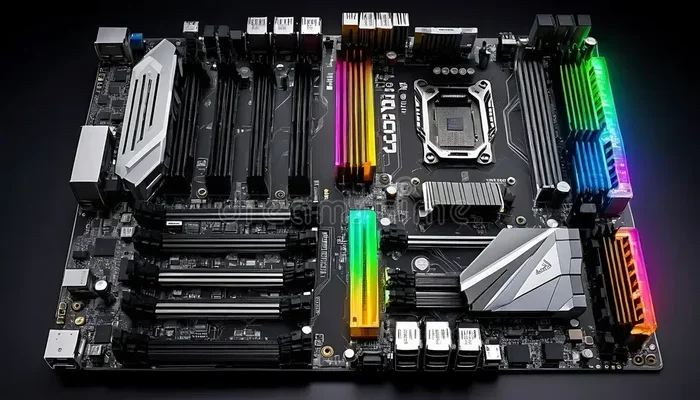
Finding the right motherboard for your gaming PC can make or break your setup. The best motherboards for gaming PCs balance raw performance, expandability, and value. Whether you are building on a tight budget or going all-out with a high-end rig, the right board ensures your GPU, RAM, and storage run at their full potential. This guide breaks down the top picks across every price range so you can choose with confidence.
Building a gaming PC is exciting. You pick your processor. You choose your graphics card. You grab the fastest RAM you can find. But one piece often gets overlooked: the motherboard. Your motherboard is the backbone of your entire system. It connects every component and lets them talk to each other. Choosing the best motherboards for gaming PCs means your whole build runs smoother and faster.
Not all motherboards are created equal. Some are packed with features for enthusiasts. Others focus on value and essentials. The key is matching the right board to your needs. This guide covers everything you need to know. We will look at features, budget options, and top brands. By the end, you will know exactly which board to pick for your next gaming PC build.
Key Takeaways
- VRM quality matters most: A strong VRM design keeps your CPU stable during intense gaming sessions and overclocking.
- RAM support varies widely: Look for motherboards that support high-speed DDR4 or DDR5 RAM for the best gaming performance.
- PCIe slots determine expansion: More PCIe lanes mean better GPU and NVMe SSD performance.
- Budget boards can still impress: You do not need to spend a fortune to get a solid gaming motherboard.
- Form factor affects your build: ATX, Micro-ATX, and Mini-ITX boards each suit different PC cases and needs.
- Brand reputation helps: ASUS, MSI, Gigabyte, and ASRock lead the gaming motherboard market for good reason.
- Chipset choice drives features: Your chipset determines USB ports, overclocking ability, and PCIe lane allocation.
📑 Table of Contents
Why Your Motherboard Matters for Gaming
Some gamers think the motherboard does not affect performance much. That is not entirely true. Your motherboard shapes how well your CPU and GPU work together. A cheap board with poor power delivery can bottleneck a high-end processor. On the other hand, a quality board unlocks your components full potential.
Here are the main reasons your motherboard choice matters for gaming:
- Power delivery (VRM): The VRM regulates power to your CPU. Better VRMs keep your system stable under load.
- RAM compatibility: Not all boards support fast memory speeds. Your choice affects frame rates and multitasking.
- PCIe lane allocation: More lanes mean better GPU and storage performance.
- Expansion options: More USB ports, M.2 slots, and audio features improve your overall experience.
- Overclocking support: Some chipsets let you push your CPU beyond stock speeds for extra gaming power.
What Is a VRM and Why Should You Care?
The Voltage Regulator Module, or VRM, supplies power to your CPU. When you are running a demanding game, your CPU draws a lot of power. A weak VRM causes temperature spikes and throttling. This drops your frame rates. A strong VRM keeps things cool and steady. If you plan to overclock, VRM quality becomes even more critical.
Top Features to Look For in a Gaming Motherboard
When shopping for the best motherboards for gaming PCs, certain features stand out. Here is what you should focus on before buying.
Chipset Selection
Your chipset determines what your board can do. Intel and AMD each offer different tiers. For Intel, the Z790 chipset supports overclocking and the most PCIe lanes. The B760 is a solid mid-range option. For AMD, the X670E chipset leads in features and expansion. The B650 offers great value for most gamers.
RAM Support and Speed
Modern gaming demands fast memory. Look for boards that support DDR5 RAM if you want the best performance. DDR4 boards still work well for budget builds. Check the maximum supported speed on the motherboard spec sheet. Higher speed RAM can improve frame rates in many games.
Expansion and Connectivity
A good gaming motherboard gives you plenty of ports. Look for at least two M.2 slots for NVMe SSDs. USB 3.2 Gen 2 ports speed up external drives. Built-in Wi-Fi 6E or Wi-Fi 7 saves you from buying a separate card. Quality audio codecs also enhance your gaming experience with clearer sound.
Best Motherboards for Gaming PCs by Budget
Not everyone has the same budget. Here are the best motherboards for gaming PCs across three price ranges.
Budget-Friendly Options (Under $150)
You do not need to spend a lot to build a capable gaming PC. The MSI PRO B760M-A offers solid performance at an affordable price. The Gigabyte B650M GAMING X AX is a great AMD option under $150. Both boards deliver reliable power delivery and enough features for most gamers. You will not feel like you are missing out on the essentials.
Mid-Range Picks ($150 to $300)
This range hits the sweet spot for most gaming builds. The ASUS TUF Gaming B760-Plus WiFi offers excellent VRM cooling and strong connectivity. The MSI MAG B650 Tomahawk WiFi is a top choice for AMD builds. These boards support fast RAM, multiple M.2 drives, and stable overclocking. They give you room to grow without breaking the bank.
High-End Boards ($300 and Above)
Enthusiasts and extreme gamers need top-tier hardware. The ASUS ROG Maximus Z790 Hero delivers premium power delivery and features. The Gigabyte Z790 AORUS Master offers incredible thermal performance. These boards are built for overclocking, multiple GPUs, and the fastest RAM kits available. If you are building a flagship gaming PC, these are the boards to consider.
Form Factor: Which Size Is Right for You?
Motherboards come in different sizes called form factors. Your case determines which sizes fit. Here is a quick breakdown of the most common options.
- ATX: The standard full-size board. Offers the most PCIe slots and RAM slots. Best for large tower cases and feature-rich builds.
- Micro-ATX: A smaller board that still fits most cases. Great balance of features and compact size for mid-range gaming PCs.
- Mini-ITX: The smallest option. Perfect for compact gaming builds. You may get fewer expansion slots but the size is unbeatable.
Pick the form factor that matches your case and build goals. Most gaming PCs use ATX or Micro-ATX boards.
Common Mistakes to Avoid When Choosing a Motherboard
Even experienced builders make mistakes. Here are common pitfalls to watch out for.
- Ignoring CPU compatibility: Always check that the motherboard supports your specific CPU. Intel and AMD sockets are not interchangeable.
- Skipping VRM research: A board with weak power delivery will hold back a powerful CPU. Check reviews for thermal performance.
- Overlooking BIOS updates: A board that needs frequent BIOS updates for new CPUs can be a hassle. Look for boards with good out-of-box support.
- Buying more than you need: A high-end board on a budget build wastes money. Match the board to your actual needs.
- Forgetting about clearance: Large heatsinks on some boards may not fit smaller cases. Always check dimensions before buying.
Final Thoughts
The best motherboards for gaming PCs are not just about brand names or price tags. They are about finding the right fit for your build. Consider your CPU, your budget, and your gaming goals. A solid mid-range board will serve most gamers perfectly well. If you are pushing the limits with overclocking or multiple GPUs, invest in a premium board with strong VRMs and expansion options.
Take your time. Read reviews. Compare specs. The right motherboard will give your gaming PC a strong foundation for years to come. Happy building.
Frequently Asked Questions
What is the best motherboard for gaming on a budget?
The MSI PRO B760M-A and the Gigabyte B650M GAMING X AX are excellent budget choices. They offer solid power delivery, good RAM support, and essential features at an affordable price. You can build a capable gaming PC without spending over $150.
Do I need an expensive motherboard for gaming?
No, you do not need an expensive motherboard for most gaming setups. A mid-range board in the $150 to $250 range handles modern games with ease. Only choose a premium board if you plan to overclock heavily or use high-end components that demand stronger power delivery.
What chipset should I choose for my gaming motherboard?
For Intel builds, the Z790 chipset offers the most features and overclocking support. The B760 is a great value alternative. For AMD, the X670E is the top-tier choice, while the B650 delivers excellent performance at a lower price. Your chipset choice affects USB ports, PCIe lanes, and overclocking ability.
Does motherboard size matter for gaming performance?
Motherboard size does not directly affect gaming performance. However, larger boards like ATX offer more expansion slots and better airflow. Smaller boards like Mini-ITX can still deliver excellent gaming performance if you choose a well-designed model with strong VRMs and RAM support.
Can I use any RAM with any motherboard?
No, you need to match your RAM type to your motherboard. DDR4 and DDR5 are not compatible with the same board. Always check the motherboard specifications for supported RAM types and speeds. Using RAM at the right speed ensures the best gaming performance.
How often should I update my motherboard BIOS?
Update your BIOS when you need support for a new CPU or want performance and stability improvements. Most modern boards offer easy BIOS updates through USB or built-in software. Check your motherboard manufacturers website for the latest BIOS versions and release notes.
=== CONCLUSION ===
Choosing the best motherboards for gaming PCs comes down to understanding your needs. Focus on VRM quality, RAM support, and chipset features that match your build. Whether you go budget, mid-range, or premium, the right motherboard will keep your gaming PC running at its best. Use this guide to make a confident choice and enjoy a smoother, faster gaming experience.